

Additional Information for Income Tax Self Assessment (ITSA)
The Additional Information section is a central hub in My Tax Digital for recording income, reliefs, and expenses that are not captured in your regular quarterly business or property updates.
This section covers "non-mandated" income—the various other sources of revenue or tax relief that HMRC requires to generate your final tax calculation for the year.
Setup
The first time you open the Additional Information section, you will be presented with a short setup questionnaire. Your answers control which categories appear on the Additional Information dashboard — only the sections you select will be shown.
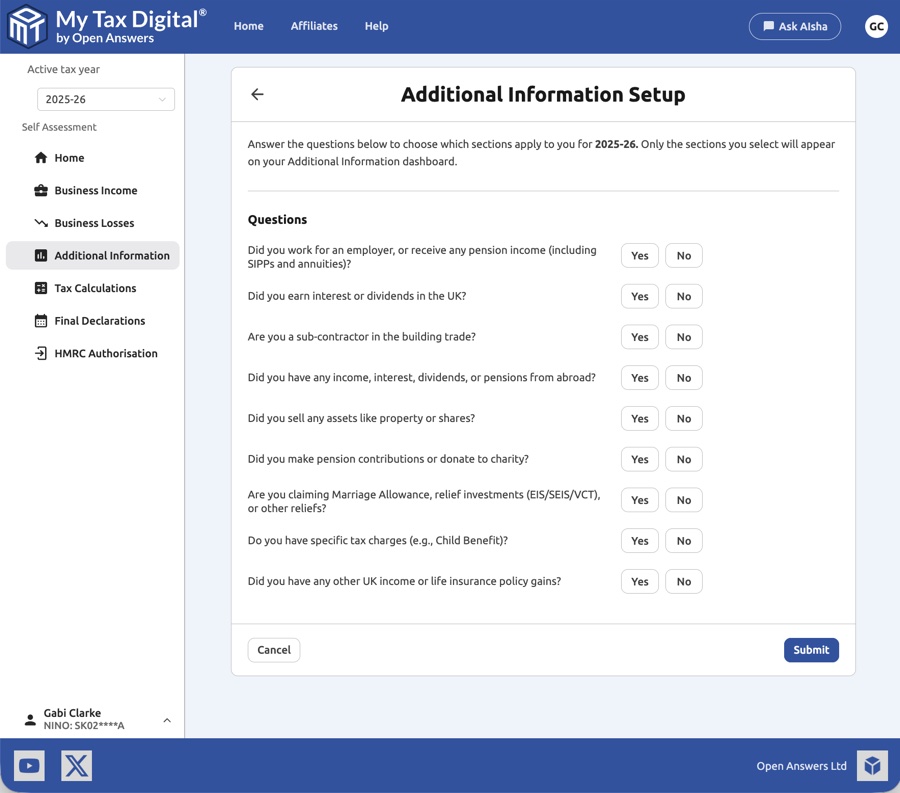
Answer Yes or No to each question. You can return and update your answers at any time to add or remove categories.
Dashboard
After completing setup, you will see the Additional Information dashboard — a grid of tiles representing each category you have enabled.
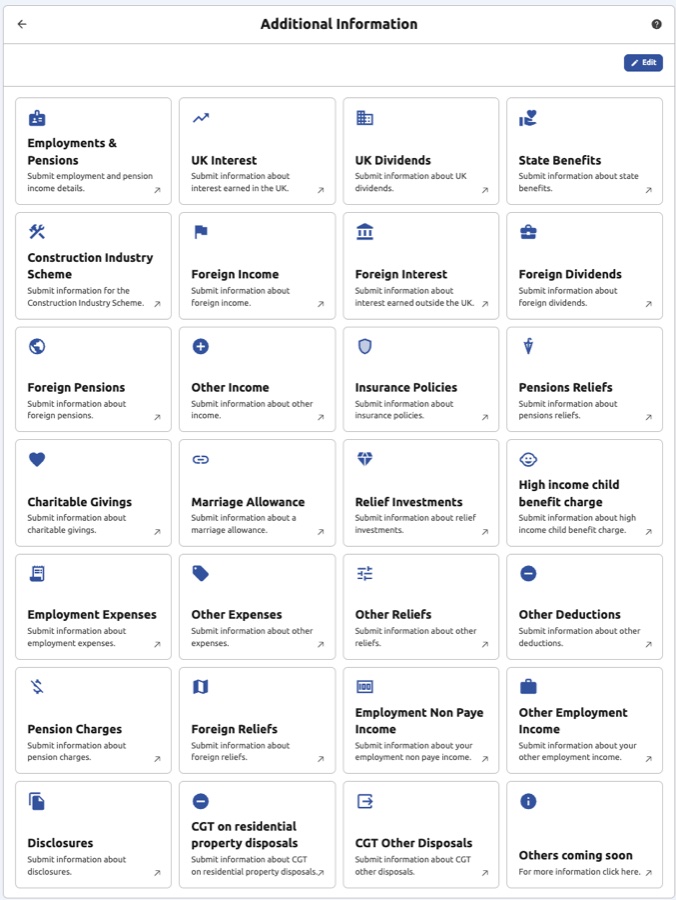
Click any tile to enter or update figures for that category. Use the Edit button (top-right) to revisit the setup questionnaire and add or remove categories at any time.
How to Access
- Self Assessment Home Screen: Click the Additional Information tile.
- Navigation Menu: You can also select Additional Information from the left-hand side menu at any time.
Categories of Additional Information
The platform provides specific tiles to help you categorise your data. Select the relevant tile to enter your figures:
1. Employments & Pensions
- Employments: Submit employment and pension income details, including PAYE income, benefits in kind, and pension receipts.
- Financial Details: Record financial details associated with your employments, such as occupational pension contributions.
2. Investment & Savings
- UK Interest: Report interest from UK bank accounts and building societies.
- UK Dividends: For income received from UK company shares.
- Dividend Information: Report additional dividend details including stock dividends and redeemable shares.
- Securities & Foreign Interest: For UK gilt-edged securities interest and savings interest earned outside the UK.
- Foreign Dividends: For dividend income received from overseas companies.
3. Pensions & Benefits
- State Benefits: Declare taxable social security benefits, including UK State Pension, JSA, and Carer's Allowance. To enable this tile during setup, answer Yes to the question about state benefits or social security payments — this includes UK State Pension even if you think of it as pension income rather than a benefit.
- Foreign Pensions: For pension income received from overseas.
- Pensions Reliefs: Record contributions to registered schemes that qualify for tax relief.
- Pension Charges: Report any pension charges due (e.g. annual allowance charges or unauthorised payments).
- High Income Child Benefit Charge: Declare the charge if you or your partner receive Child Benefit and either of you has an income over the threshold.
- Student Loan: Report student loan repayments deducted from your income.
4. Employment & Professional
- Construction Industry Scheme (CIS): For subcontractors to report deductions made from their payments.
- Employment Expenses: Costs related to your employment that have not been reimbursed by your employer.
- Employment Non Paye Income: Report employment income not taxed through PAYE (e.g. tips or non-PAYE earnings).
- Other Employment Income: For any other taxable income derived from employment not reported elsewhere.
- Marriage Allowance: Apply to transfer a portion of your personal allowance to your spouse or civil partner.
5. Reliefs & Givings
- Charitable Givings: Record Gift Aid donations or other qualifying charitable gifts.
- Relief Investments: For specific investment schemes that offer tax relief (e.g. EIS, SEIS, or VCT).
- Other Reliefs: General relief claims not covered by the specific relief categories.
- Other Expenses: Miscellaneous allowable expenses not reported elsewhere.
- Other Deductions: Any further deductions you are entitled to claim.
- Other Income: Report any other taxable income not covered by the other categories.
- Insurance Policies: Declare gains from life insurance policies or other chargeable event gains.
6. Overseas Income
- Foreign Income: For general income earned abroad that is taxable in the UK.
- Foreign Reliefs: Claiming back tax paid on income that has already been taxed in another country.
7. Capital Gains Tax
- CGT on Residential Property Disposals: Report gains from the disposal of UK residential property.
- CGT Other Disposals: Report capital gains from the disposal of other assets (e.g. shares, commercial property, or personal possessions above the threshold).
When to Submit
Submitting an Additional Information category early is optional for most categories, not required. UK Interest, UK Dividends, Dividend Information, Securities & Foreign Interest, Foreign Dividends, State Benefits, Foreign Pensions, Pension Charges, Charitable Givings, Relief Investments, Other Reliefs, Other Income, Other Deductions, and CIS can be submitted and updated to HMRC at any point during the tax year, but you can just as well leave them until you're ready to complete your Final Declaration — there's no requirement to enter them as you go.
A smaller set of categories can only be submitted to HMRC after the tax year has ended, regardless of which software you use: Capital Gains Tax, Employment Expenses, Employment Non PAYE Income, Foreign Pensions relief adjustments, and the High Income Child Benefit Charge. These simply aren't available any earlier — this is set by HMRC, not by My Tax Digital.
Whichever categories apply to you and whenever you submit them, none of this affects your tax bill until you complete your Final Declaration at the end of the year — that is the step where everything you've entered is brought together into your final calculation. Only your quarterly business and property income and expenses are required on a fixed quarterly schedule.
Important Considerations
- Tax Year Selection: Before entering any information, ensure the Active Tax Year (top-left dropdown) is set to the year you are currently filing for.
- Supporting Documents: You should have your year-end certificates (such as P60s, P11Ds, or interest statements) to hand to ensure the figures you enter are 100% accurate.
- Disclosures: If you need to provide extra context or specific notes to HMRC regarding your tax affairs, use the Disclosures tile on the dashboard.